SF Trade

FOR INDIVIDUAL TRADERS

One trading platform.
Your whole workflow.

Start your trading day in SF Trade. Our planned launch brings market screening, research, news, supported broker accounts, strategy tools and trade review together in one workspace, with one $249/month SF Trade subscription.

Coming mid-November 2026. Explore the current development build below.

THE CORE WORKSPACE

From a broad market view
to the companies you care about.

01 / SF STOCKS

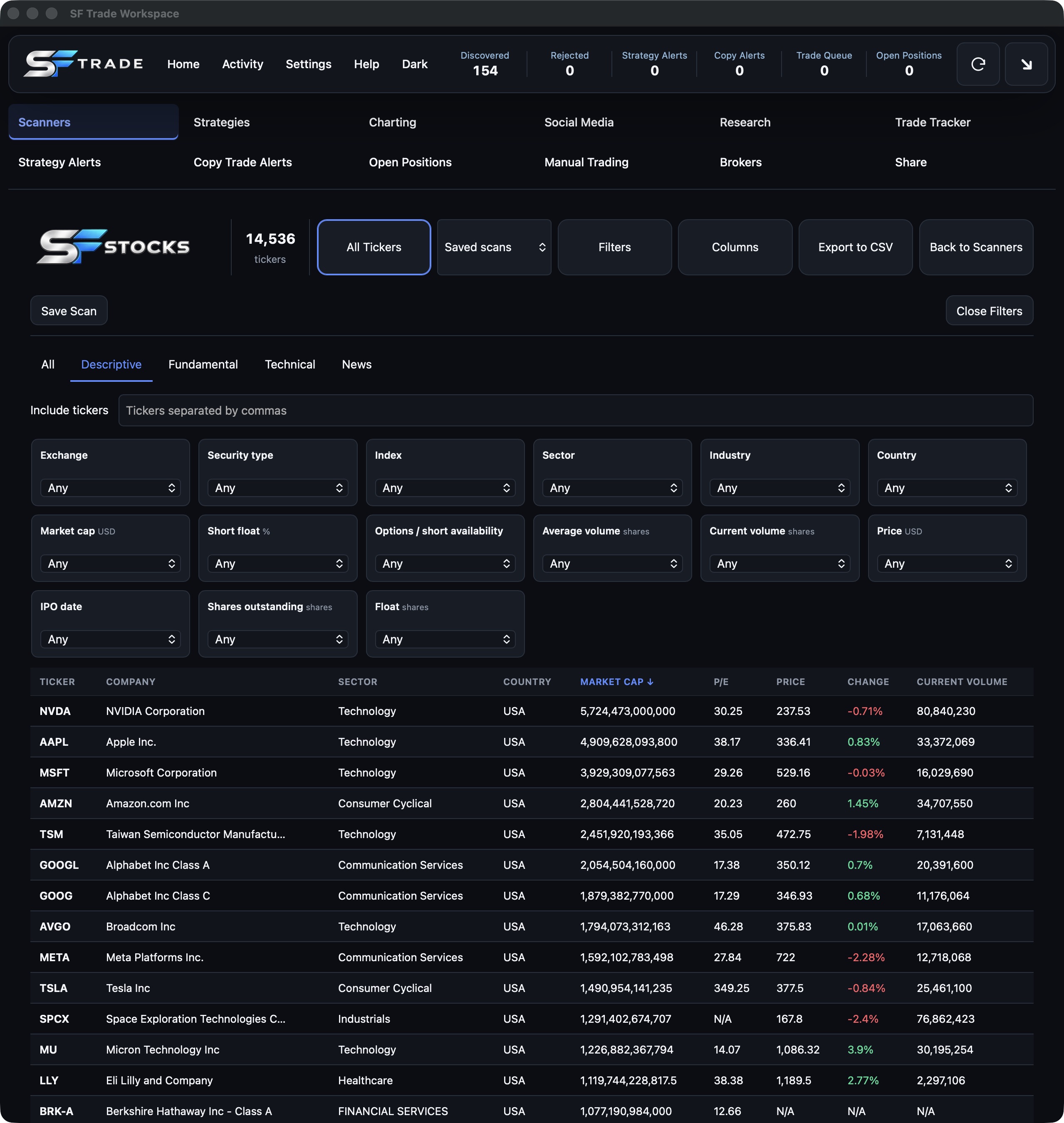
Screen the market your way.

Start with a broad list of stocks, ADRs, ETFs and other listed securities, then narrow it to your criteria.

  • Company, valuation, financial, performance and technical filters.
  • Price, volume, market cap, sector, exchange and security-type screening.
  • Save named scans and return to your setups.
  • Sort results, choose columns or apply a column preset.
  • Choose 20, 50 or 100 results per page and export matching results to CSV.
  • Open company information or jump directly to related news.

Live updates are available for supported securities. Coverage varies; some instruments use dated daily prices, and unavailable values remain N/A.

02 / SF OPTIONS

Put options activity in context.

Explore incoming options activity alongside historical sessions, using filters that fit your research.

  • Live activity and historical date views.
  • Filter and sort contract results with minimum and maximum criteria.
  • Save scans for a repeatable research workflow.
  • Review contract details and return-related fields, including Return So Far, Daily High and Peak Return.
  • Open the underlying company’s news from a contract.
  • Use a saved options scan to focus your News feed.
03 / SF NEWS

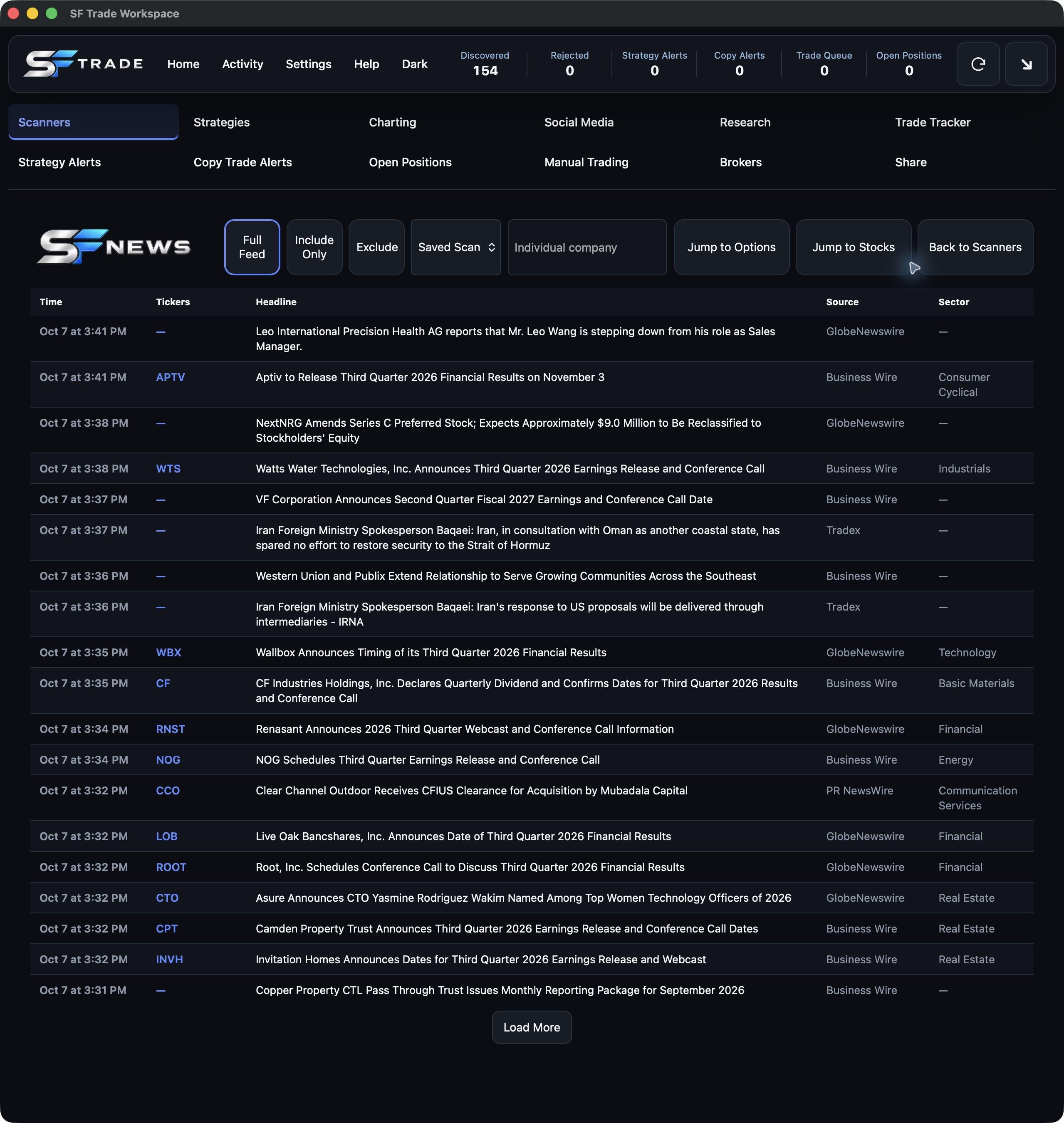
Follow the story behind the ticker.

See the day’s headlines, then focus on an individual company or the companies in your scans.

  • Full Feed covers the current day, midnight to midnight Central.
  • Include Only and Exclude ticker filters; exclusions take priority.
  • Match headlines to saved Stocks or Options scans.
  • Search a company or ticker for today and the preceding 30 days of available headlines.
  • See company tags and sectors where a reliable match is available.
  • Jump back to your scanner without losing your place.
04 / YOUR WORKFLOW

Keep your research connected.

Move between screening and news without rebuilding your setup each time.

  • Your own filters, saved scans and column choices.
  • A consistent workspace across Stocks, Options and News.
  • Shared market data with individual screening preferences.
  • Direct navigation between company news and scanner workspaces.

Mac and Windows are the planned desktop platforms. Release availability will be confirmed before launch.

INSIDE SF TRADE

See the actual workspace.

Real screenshots from the current development build. Select an image to view it at full size. Market data shown is a captured example, not a live feed.

SF Stocks showing descriptive filters, saved scans, custom columns and stock results
SF StocksCompany and market filters alongside sortable results.
SF News showing Full Feed, ticker filters, saved scanner selection and company headlines
SF NewsHeadlines connected to tickers, sectors and your scans.

BEYOND THE SCANNERS

Research, plan, trade and review.
One connected workspace.

The wider SF Trade platform is being built around the complete trading workflow. The tools below are in development or final integration and testing; supported connections and release availability will be confirmed before launch.

STRATEGY TRADING

Turn your approach into a repeatable plan.

Build saved strategies around your scanner criteria, entry conditions and exit rules. The planned workflow connects qualifying opportunities to strategy alerts and trading controls.

  • Organize strategies around the setups you follow.
  • Define position sizing and risk limits.
  • Review strategy-generated opportunities before taking action.
BACKTESTING

Explore an idea before putting it to work.

Set up historical tests for a saved strategy using a selected period, starting balance, commissions and slippage assumptions.

  • Save test configurations without changing the original strategy.
  • Planned results include return, win rate, drawdown, profit factor and trade count.
  • Compare results with the assumptions and available history behind them.

Test setup is built; historical test execution is still being connected. Simulated results do not predict future performance.

TRADE TRACKING

See what happened—and learn from it.

Bring trade history, performance and personal notes into a dedicated review workspace.

  • Review entries, exits, fees and realized or unrealized results.
  • Group trades by strategy, broker, manual trading or copy trading.
  • Filter by ticker, date and trade status.
  • Keep personal notes and screenshots with your trade review.

Broker-synced history is being finalized; current previews remain separate from real account activity.

RESEARCH & RECOMMENDATIONS

Find patterns in your own trading.

The research workspace is designed to compare strategies and surface findings from your trade history for you to review.

  • Compare outcomes, win rates and profit factors by strategy.
  • Explore early adverse moves, holding times and entry periods.
  • Review peak profit and how much was retained at exit.
  • Use findings to form new ideas for backtesting.

Recommendations depend on sufficient trade and price history. They are research inputs, not guaranteed outcomes or automatic changes to your strategies.

BROKER INTEGRATIONS

Your supported brokers, together.

SF Trade’s planned broker connections bring supported accounts into one platform, so you can move between accounts without rebuilding your research workflow.

  • Organize multiple connected accounts in one workspace.
  • Choose the account for a trading workflow.
  • Review positions and trading activity alongside your research.
  • Configure account-specific trading limits.

Broker connections and order execution are still being finalized. This does not mean every brokerage is supported; the supported broker list will be confirmed before release.

COPY TRADING

Follow a leader through a connected workflow.

Planned copy-trading tools let you follow participating creators or group leaders through dedicated Copy Trade Alerts.

  • Keep followed trade ideas alongside your own scans and research.
  • Connect those alerts to your selected account and trading controls.
  • Review copy-trading activity separately in trade tracking.

Leader connections, execution permissions and member controls are being tested. Automatic execution is not currently promised.

AI INTEGRATIONS

Bring AI into your research workflow.

Planned AI integrations are intended to help you explore research, discuss trading ideas and interpret information within the SF Trade workspace.

  • Ask questions in the context of your research.
  • Use AI-assisted analysis as another input to your decision-making.
  • Connect research ideas with strategy development and review.

Supported AI providers, capabilities, data permissions and any separate costs will be confirmed before release. AI output requires your review.

TRADINGVIEW INTEGRATION

Your charts. In your trading platform.

Access TradingView from inside SF Trade and keep chart analysis alongside your scanners, research, news and trading tools.

  • Bring TradingView into your everyday SF Trade workflow.
  • Keep charts and market research together in one platform.
  • On our roadmap: integrated charting without a separate TradingView account.
THE REST OF YOUR WORKSPACE

Keep the tools around the trade close by.

Charting, social media, manual trading, open positions, alerts and sharing are also part of the platform being reviewed before launch.

  • Move from screening to deeper research and chart context.
  • Keep manual and strategy workflows in the same application.
  • Review alerts, positions and activity from dedicated workspaces.

SF Momentum is planned for launch and is still in development.

ONE SUBSCRIPTION. ONE WORKSPACE.

A $744.50/month tool stack.
SF Trade: $249/month.

One platform for your trading day. SF Trade’s planned launch brings screening, news, research, supported brokerage accounts, strategy tools and trade review into one connected workspace. Open SF Trade in the morning and keep your workflow together, instead of jumping between separate tools. Compare our $249/month subscription with the $744.50/month selected subscription stack below—a difference of $495.50 each month.

Tool categorySelected monthly price
Stock screening and charting$39.50
Options flow$75.00
Heat map / gamma analysis$99.00
News feed$37.00
Trade tracking, backtesting and AI review$99.00
Strategy execution and broker connections$99.00
Copy trading$99.00
Unified brokerage trading interface$70.00
Live momentum scanning$127.00
Selected subscriptions total$744.50/month

SF Trade standard

$249/month

$495.50 less per month than the selected stack.

Illustrative comparison of selected publicly listed USD monthly plans, checked October 7, 2026.

Request early access

EARLY ACCESS

Your trading tools.
One subscription.

SF Trade is $249/month. Bring your trading workflow together in one platform.

LET’S TALK ABOUT YOUR WORKFLOW

Want to know more?

Ask about the features, planned release or early access. Tell us what you trade and what you want from your research workspace.

Request more information

Request early access ↗

HERE TO HELP

Questions before you join?

Contact the SF Trade team for individual-user information.

help@sftrade.ai ↗

EARLY ACCESS

Request early access.

Leave your details and the SF Trade team will review your request.

We’ll use these details to respond to your early-access request.